What Is Geometry Dash?
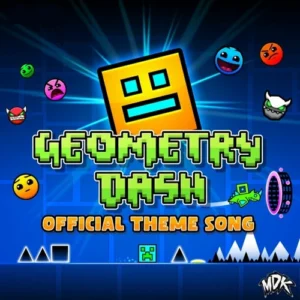
Geometry Dash is an exciting rhythm-based action platformer developed by RobTop Games and released on August 13, 2013. In this game, players control a cube that navigates through challenging levels filled with obstacles, all while syncing their movements to catchy music tracks. With its simple one-touch gameplay, players can jump, fly, and flip through dangerous passages, making it a fun and addictive experience for kids and gamers alike.
Geometry Dash Gameplay Mechanics
In this exciting action platformer, players control a cube that automatically moves forward through vibrant levels filled with challenging obstacles. Your main task is to tap the screen or press the spacebar to make your character jump, dodging spikes and walls that can end your run in an instant. Timing is crucial, as each jump must be perfectly synchronized with the rhythm of the music to navigate through the hazards successfully.
As you progress, you’ll encounter various mechanics such as flying rockets and gravity-flipping sections, adding layers of complexity to your gameplay. The game features 26 official levels, each designed with increasing difficulty, while user-generated levels provide endless replayability. Utilize practice mode to break down tricky sections and place checkpoints, allowing you to master each part before attempting a full run.
The vibrant soundtrack enhances the experience, encouraging you to keep moving forward and anticipate obstacles based on the beat. Whether you’re jumping over spikes or steering vehicles with arrow keys, every moment is filled with excitement and challenge in this unique platforming adventure.
Play Geometry Dash on Any Device
You can play this game directly in your web browser on desktop, laptop, tablet, or mobile.
How to Play Geometry Dash: A Beginner’s Guide
In this exciting platformer, you control a shape that jumps and dodges obstacles to the beat of the music! The game is all about timing and rhythm, so listen closely as you navigate through each level. Your goal is to reach the end without crashing into any spikes or walls!
- The shape moves automatically, so your main job is to tap the screen or click to make it jump.
- Timing is everything! Jump just before hitting obstacles to avoid crashing.
- If you hit something, don’t worry! You’ll restart right away to try again.
- Use practice mode to break down levels into smaller parts and learn where the tricky spots are.
- Pay attention to the music; it helps you know when to jump!
Mastering Geometry Dash Controls
In this rhythm-based action platformer, players control a cube navigating through challenging terrains and obstacles. The controls are designed to be simple yet require precise timing for success:
- Jump: Press the spacebar or tap the screen to make your character jump.
- Hold: Hold down to jump higher when controlling certain icons, like the robot.
- Tap: Tap to switch gravity when using the spider icon.
- Steer Vehicles: Use the up and down arrow keys to navigate vehicles during specific segments.
The game features automatic scrolling levels, so timing your jumps is crucial. Missing an obstacle results in an instant restart, making practice essential for mastering each level’s layout and rhythm.
Pro Tips to Master Geometry Dash
To become a Geometry Dash pro, focus on these essential strategies that will elevate your gameplay and help you conquer even the toughest levels!
- Utilize Practice Mode: Break down levels into manageable sections. Use checkpoints to practice tricky spots repeatedly until you can clear them consistently.
- Follow the Rhythm: Listen closely to the music, as it guides the timing of obstacles. Sync your jumps with the beat for smoother navigation.
- Start with Official Levels: Familiarize yourself with the game mechanics by completing the main levels before tackling user-generated content.
- Master Each Section: Focus on perfecting one segment at a time. Once you feel confident, move on to the next part of the level.
- Be Patient: Don’t rush through levels. Take your time to learn patterns and improve your timing, as mastering the game requires practice and persistence.
Key Features That Make Geometry Dash Special
Geometry Dash offers a thrilling blend of rhythm and action that keeps players engaged. With its unique gameplay mechanics and vibrant levels, it stands out as a favorite among platforming enthusiasts. Here are the key features that make it truly special:
- Rhythm-based action platforming that syncs gameplay with music beats.
- 26 official levels with increasing difficulty to challenge your skills.
- User-generated levels that enhance replayability and creativity.
- Diverse icon transformations for varied gameplay experiences.
- Practice mode to help memorize tricky sections and improve performance.
- Regular updates introducing new features, mechanics, and levels.
- Simple one-touch controls that are easy to learn yet hard to master.
- Fun gameplay filled with spiky obstacles and exciting challenges.
Play Geometry Dash Online for Free
Experience the thrill of this browser-adapted version that brings the excitement of the original game directly to your web browser. Whether you’re using Chrome, Firefox, Safari, or Edge, you can jump into action without any downloads. Enjoy features like rhythm-based action platforming and practice mode, all while customizing your character with new icons and colors!
Is Geometry Dash Free to Play?
Yes, you can enjoy free online play with no fees or in-app purchases required. All games on our site are completely free, allowing players to experience thrilling rhythm-based action without any financial commitment. The benefits of free play include access to challenging levels, practice modes for skill enhancement, and the opportunity to unlock new icons and colors—all while honing your timing and reflexes in a fun, engaging environment.
Play Geometry Dash Unblocked
Yes, play Geometry Dash Unblocked on going-balls.com. Whether you’re at school, at work, or on a break—you can play without any restrictions. Enjoy the same rhythm-based action platforming experience without the hassle of firewalls or restrictions. Unlock new icons, challenge yourself with user-generated levels, and utilize practice mode to sharpen your skills anytime, anywhere!
Geometry Dash on GitHub
No need to search on GitHub, our version works on all devices at school or work. With simple one-touch gameplay and rhythm-based action platforming, you can enjoy the same thrilling experience without the hassle of downloading from external sources. Unlock new icons, customize your character, and challenge yourself with levels that vary in difficulty—all accessible directly in your browser!
Download Geometry Dash (PC, iOS, Android)
Many fans enjoy downloading it for an even smoother experience. Here’s how:
- Android: Open the Google Play Store and tap Install.
- iOS: Open the App Store on your iPhone or iPad and tap Get.
- APK: Android users who can’t use Google Play can find and download the APK from trusted sites to install offline.
- PC Steam: If you like playing on a computer, download the game for free via Steam and enjoy a bigger screen and controller support.
Geometry Dash Extension
Enhance your gaming experience with the Chrome extension for instant play. This extension allows you to jump right into the action without any delays, and it may offer offline modes for uninterrupted gameplay. Enjoy seamless access to your favorite levels and user-generated content, making it easier to practice and improve your skills on the go!
FAQs about Geometry Dash
Is Geometry Dash free to play?
Yes, it is 100% free to play. You can enjoy all the fun without any downloads or payments!
Can I play Geometry Dash at school?
Yes, you can play it at school if it’s unblocked. Just make sure your school allows gaming during breaks!
Does Geometry Dash work on mobile/phone?
Yes, it works perfectly on mobile devices. You can download it from the app store for on-the-go fun!
Do I need to download Geometry Dash?
Yes, you need to download it to play on your device. It’s available for free on various platforms.
Can I play Geometry Dash on Chromebook?
Yes, you can play it on a Chromebook. Just access it through a browser or download it if supported!
Is there a practice mode in Geometry Dash?
Yes, there is a practice mode. It helps you learn levels and improve your skills before trying them in normal mode!
Are there user-generated levels in Geometry Dash?
Yes, there are many user-generated levels. This feature adds tons of replayability and creativity to the game!
Can I customize my character in Geometry Dash?
Yes, you can customize your character. Unlock new icons and colors as you progress through the game!
Conclusion
Geometry Dash is an exhilarating platformer that combines rhythm and skill, making it a perfect choice for kids seeking fun and challenge. With its vibrant graphics and catchy soundtracks, players can jump, fly, and flip their way through exciting levels while customizing their characters. The game encourages creativity through user-generated levels, ensuring endless entertainment.
Why not dive into the action today? Gather your friends and challenge each other to see who can conquer the most levels. Play Geometry Dash online now and experience the thrill of mastering each obstacle together!